
What's New in v1.4: Moments, Find Mode, and Faster Indexing
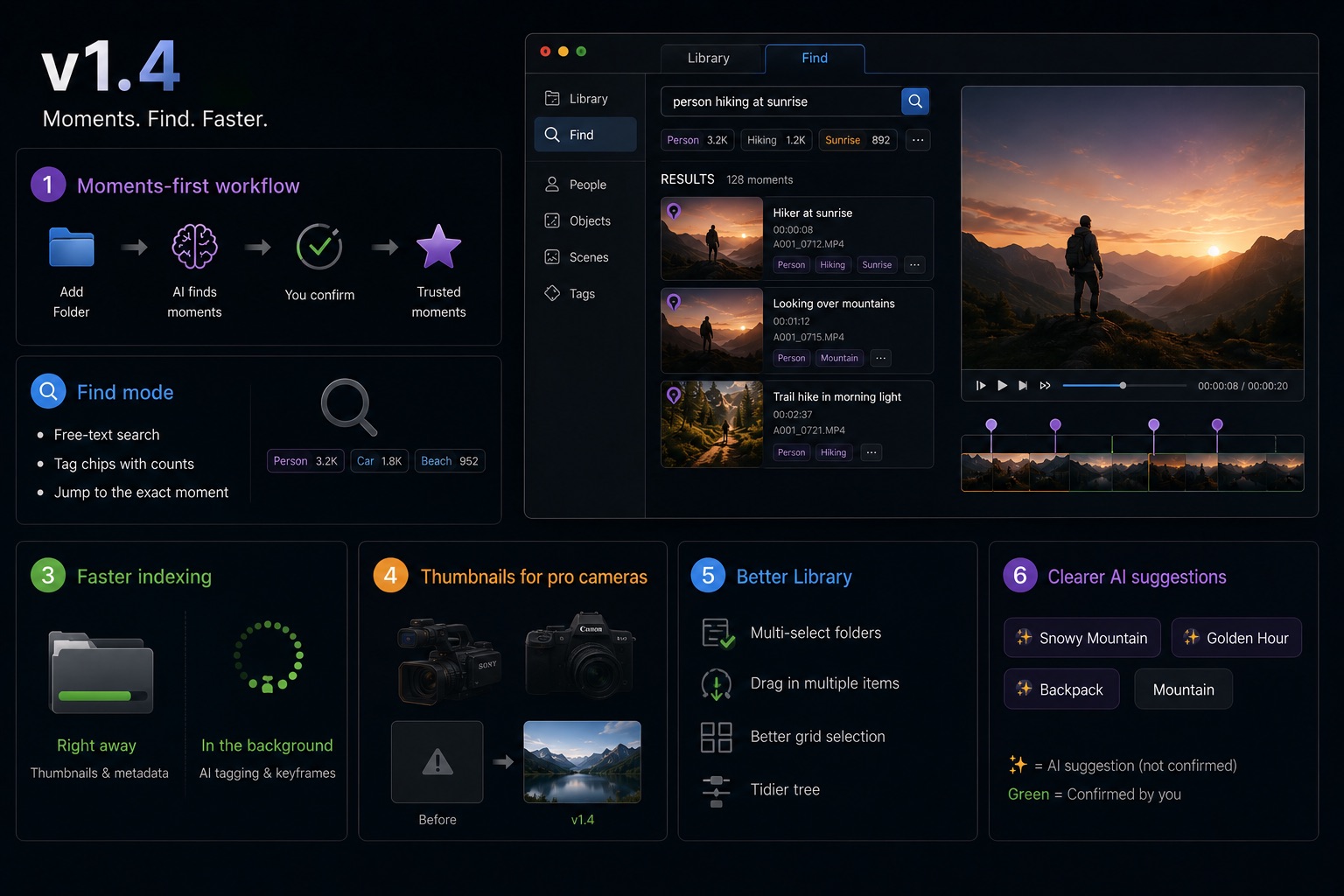
VideoTagger v1.4 is the biggest update since launch. It reshapes the day-to-day flow around Moments, gives search its own dedicated mode, and makes indexing feel instant. Here is what changed, starting with the things you will notice first.
A new main flow built around Moments
A video is no longer a single thing you tag. v1.4 makes the Moment — a specific point or range inside a clip — the unit you work with.
- Add a folder to your Library and VideoTagger indexes it in the background.
- As the AI recognizes people, objects, and scenes, it drops candidate moments at the exact spots where they appear.
- You confirm the ones you trust. Confirmed moments become your reliable, searchable layer; everything else stays as a suggestion until you say otherwise.
The result: instead of remembering which file a shot lives in, you go straight to the moment.
Find: a dedicated search workspace
Search now has its own mode. Switch to Find and your whole library becomes searchable from one place.
- Free-text search — describe what you are looking for and get matching moments back.
- Tag chips with counts — every tag now shows how many videos contain it, so you can see at a glance where your footage actually is.
- Jump to the moment — results land you on the exact point in the timeline, marked right where the match occurs. This works for AI-generated tags too, not just the ones you typed.
Indexing that gets out of your way
Adding footage used to mean waiting. In v1.4, indexing runs in two stages so the grid is useful immediately:
- Right away — thumbnails and metadata appear, so you can browse and start working.
- In the background — AI tagging and keyframe analysis fill in afterward, without blocking you.
Indexing also resumes automatically if you quit and reopen the app, so a large library finishes on its own across sessions.
Thumbnails for pro camera footage
Footage from Sony and Canon professional cameras — HEVC 4:2:2 10-bit in particular — used to show blank or broken thumbnails because the format is hard to decode. v1.4 generates proper thumbnails for these files, and falls back gracefully for other unusual codecs instead of caching a broken image.
A faster, cleaner Library
Several improvements make a large Library easier to handle:
- Multi-select folders — Ctrl/Cmd-click several folders to see one combined grid, and remove them in a single action.
- Drag in multiple items — drop several files or folders from Explorer/Finder at once.
- Better grid selection — rubber-band drag, Shift to select a range, Ctrl/Cmd to toggle, and Ctrl/Cmd+A to select everything, with edge auto-scroll while dragging.
- Tidier tree — folders with no subfolders no longer show an expand arrow.
Clearer AI suggestions
AI candidate tags now carry a ✨ sparkle, so it is obvious which tags are suggestions waiting for your confirmation versus the ones you have already trusted.
Get v1.4
v1.4 installs as an automatic update for existing users, or you can grab the latest build from the download page. As always, all AI runs on your device — your footage never leaves your machine.
We are just getting started with the Moment-based flow. If there is something you want to do with your footage that VideoTagger does not yet make easy, let us know.
Related articles
How Far Can AI Take Video Management? VideoTagger's Design Philosophy and Roadmap
Hand your video library entirely to AI and you trade away the one thing that matters: trust. Here is why VideoTagger pairs AI candidates with one-click human confirmation — and where the roadmap goes from here.
Video Resolution, Explained — SD, HD, 4K, 8K, and What More Pixels Actually Buy You
"4K" is on every camera box and TV shelf, but resolution is the most misread number in video. Here's what the tiers from SD to 8K actually are, why DCI 4K and UHD aren't the same thing, why more pixels don't guarantee a sharper picture, and when they genuinely pay off.
HDR, Explained — HDR10, Dolby Vision, HLG, and What "High Dynamic Range" Actually Means
HDR is sold as "brighter, more vivid" — but that marketing hides what's really going on. Here's what dynamic range actually is, why HDR needs PQ or HLG curves and 10-bit color, and how HDR10, Dolby Vision, and HLG differ in one sitting.