
HDR, Explained — HDR10, Dolby Vision, HLG, and What "High Dynamic Range" Actually Means
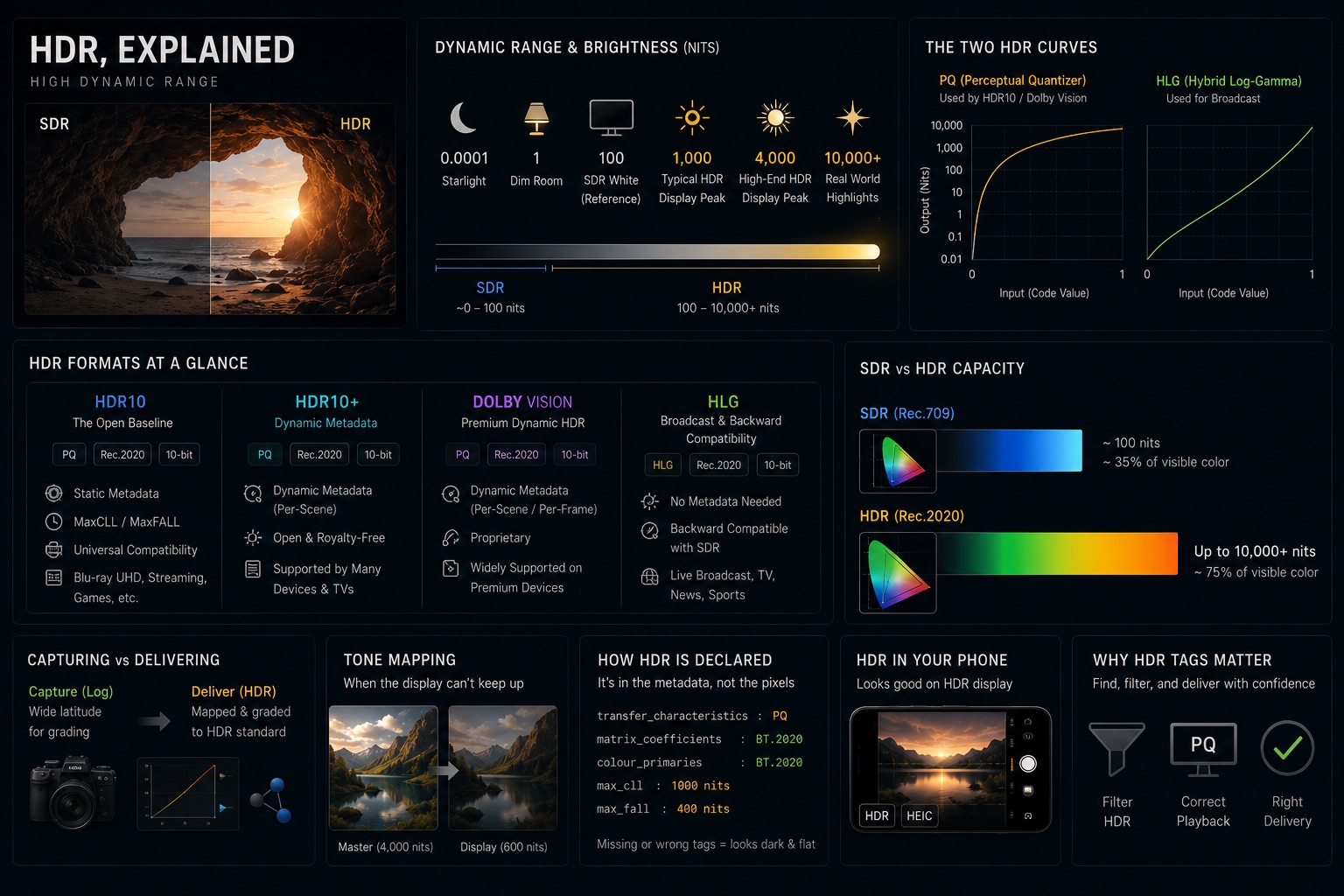
"HDR" is on the box of every premium TV, in every phone's camera menu, and stamped across streaming catalogs — usually next to the words "brighter" and "more vivid." That marketing isn't wrong, but it skips the part that matters. HDR isn't a brightness setting. It's a different way of encoding light, and getting it wrong produces footage that looks washed-out, too dark, or strangely flat on the very displays meant to show it off.
Here's what high dynamic range actually is, and how the formats — HDR10, HDR10+, Dolby Vision, and HLG — really differ.
What "Dynamic Range" Actually Means
Dynamic range is the ratio between the darkest and the brightest part of an image. A scene with deep shadow detail and a bright window that isn't blown out has high dynamic range. The real world has an enormous range — sunlight is millions of times brighter than starlight, and your eyes adapt across most of it.
Standard Dynamic Range (SDR) — the video everything used until recently — was built around the limits of the cathode-ray tube. An SDR master targets a peak brightness of roughly 100 nits, encoded with a Rec.709 gamma curve in a dim viewing room. Everything brighter than that reference white simply clips. A sunset, a candle flame, a chrome reflection — all forced into the same narrow band of code values.
HDR throws out that 100-nit ceiling. It lets the signal describe highlights that are many times brighter than SDR's reference white, while preserving shadow detail underneath — so the candle flame can be genuinely bright on screen without crushing the room around it.
Nits — The Brightness Story
A nit (candela per square metre, cd/m²) measures how much light a display actually emits. The numbers tell the whole story:
| Display / signal | Typical peak luminance |
|---|---|
| SDR mastering reference | ~100 nits |
| Typical SDR laptop / monitor | 250–350 nits |
| Entry-level "HDR" TV | 400–600 nits |
| Good consumer HDR TV | 600–1,000 nits |
| Premium mini-LED / OLED | 1,000–4,000 nits |
| HDR mastering target (common) | 1,000 or 4,000 nits |
| PQ encoding ceiling | 10,000 nits |
Two things fall out of this table. First, "HDR-capable" covers a huge spread — a 450-nit panel and a 4,000-nit panel both wear the badge, and they show the same file very differently. Second, almost no consumer display can actually hit the brightness an HDR master describes, which is why tone mapping (covered below) is unavoidable.
The Two HDR Curves — PQ and HLG
In an earlier article on color spaces we said three things define a color encoding: primaries, white point, and a transfer function. HDR is, at its core, a new transfer function — the math that maps code values to actual light. There are two, and the difference between them explains almost everything about the formats.
PQ — Perceptual Quantizer (SMPTE ST 2084). PQ is an absolute encoding. A given code value means a specific, fixed brightness in nits — code value X is 500 nits, full stop, regardless of the display. PQ is tuned to the sensitivity of human vision so the available bits are spent where the eye can see steps. It's the curve behind HDR10 and Dolby Vision, and it's what streaming and disc delivery use.
HLG — Hybrid Log-Gamma (ITU-R BT.2100). Developed jointly by the BBC and Japan's NHK, HLG is a relative encoding. Its lower half is an ordinary gamma curve — so an old SDR television shows a perfectly watchable picture — and its upper half rolls into a logarithmic curve that carries the extra highlight range. The signal scales to whatever the display can do. That backward compatibility and the absence of per-title metadata are why HLG is the choice for live broadcast.
Both curves are defined in ITU-R BT.2100 and both ride on Rec.2020 primaries. The split is philosophical: PQ pins brightness to absolute values and demands the display adapt; HLG describes a relative signal that any display can interpret.
HDR10 — The Open Baseline
HDR10 is the floor everyone supports. It's an open, royalty-free standard: PQ curve, Rec.2020 color container, 10-bit depth (hence the name), plus static metadata.
Static means one set of numbers describes the entire program:
- Mastering display color volume (SMPTE ST 2086) — the primaries, white point, and min/max luminance of the monitor the title was graded on.
- MaxCLL (Maximum Content Light Level) — the brightest single pixel anywhere in the program.
- MaxFALL (Maximum Frame-Average Light Level) — the brightest frame average in the program.
A display reads those numbers once and decides how to fit the whole title into its own capability. That's the limitation: a dark thriller with one blindingly bright explosion gets tone-mapped as if every scene might hit that peak.
HDR10+ and Dolby Vision — Dynamic Metadata
The fix for static metadata is dynamic metadata — instructions that change scene by scene, or even frame by frame.
Dolby Vision is the proprietary, licensed format. It uses PQ, supports up to 12-bit depth, and carries per-scene (or per-frame) metadata in an RPU (Reference Processing Unit) data stream. A Dolby Vision file usually contains an HDR10-compatible base layer, so a display that can't decode Dolby Vision still gets a valid HDR10 picture. The dynamic metadata lets a modest display tone-map each scene on its own terms instead of being held hostage by the brightest moment in the film.
HDR10+ is the royalty-free answer to Dolby Vision, led by Samsung. It bolts dynamic, scene-by-scene metadata onto the HDR10 baseline — 10-bit, PQ, Rec.2020 — without the licensing cost, though it stops at 10-bit where Dolby Vision goes to 12.
The practical takeaway: HDR10 = static, one-size-fits-all; Dolby Vision and HDR10+ = dynamic, adapts per scene. On a display that can already hit the mastering peak, the difference is small. On a modest display, dynamic metadata is the difference between preserved shadow detail and crushed black.
HLG — Broadcast and Backward Compatibility
HLG deserves its own note because it solves a problem the others don't. A broadcaster sending one signal to millions of homes can't assume everyone owns an HDR set, and can't attach per-title metadata to a live feed.
HLG handles both. The same transmission looks correct-ish on a legacy SDR TV (it reads the gamma portion) and opens up the full highlight range on an HDR set (which also uses the log portion). No metadata, no separate SDR and HDR feeds. That's why sports and live events in HDR are almost always HLG, while films and streaming series lean on PQ-based HDR10 or Dolby Vision.
Why HDR Needs 10-bit and Rec.2020
HDR doesn't work in isolation — it pulls in two things we covered in earlier articles.
Bit depth. Stretching the same signal across a far wider brightness range means the steps between code values get bigger. At 8-bit, those steps become visible as banding — ugly contours across a clear sky or a gradient. HDR therefore mandates 10-bit minimum (Dolby Vision allows 12-bit). This is exactly the point made in the bit-depth and chroma article: more bits buy smoother gradients, and HDR is where you finally need them.
Color. HDR is paired with the Rec.2020 wide-gamut container. Real content rarely fills all of Rec.2020 — most HDR is graded within DCI-P3 and carried inside the larger Rec.2020 box — but the container has to be wide enough to hold the more saturated, brighter colors HDR makes possible. See the color space article for the full gamut map.
So "HDR" in practice is a bundle: PQ or HLG transfer function, 10-bit (or 12-bit) depth, and Rec.2020 primaries. Drop any one and it isn't really HDR.
Capturing for HDR — Log Is Not HDR
A common confusion: people think shooting S-Log3 or V-Log is shooting HDR. It isn't. Log is a capture format; HDR is a delivery format.
Log gamma exists to cram the camera sensor's full dynamic range into a recordable signal for grading — it's deliberately flat and not meant to be displayed directly. PQ and HLG are display-referred encodings meant to be shown. The HDR grade is the step that maps your flat log capture onto a PQ or HLG delivery curve, the same way an SDR grade maps log onto Rec.709. The wide latitude of a good log capture is what gives you the headroom to grade a convincing HDR master — but the log file itself is not HDR. The log gamma article walks through that capture side in detail.
Tone Mapping — When the Display Can't Keep Up
Because PQ is absolute, content mastered at 1,000 nits will routinely land on a display that peaks at 600. The display can't reproduce the top 400 nits, so it tone-maps — compressing the brightest highlights down into its real range while trying to keep mid-tones and shadows intact.
This is where metadata earns its keep. With HDR10's static metadata, the display makes one global decision for the whole title. With Dolby Vision or HDR10+ dynamic metadata, it gets per-scene guidance and can preserve far more detail in the moments that need it. Tone mapping is never not happening on consumer hardware — the only question is how good the instructions are.
How HDR Is Declared in Metadata
Like color space, HDR is not embedded in the pixels — it's declared in container and codec metadata, and a player that ignores the declaration produces wrong results. The transfer function is the key flag:
| What's declared | Where it lives |
|---|---|
| Transfer characteristic = PQ (SMPTE ST 2084) | colr box / VUI — transfer characteristic 16 |
| Transfer characteristic = HLG (BT.2100 / ARIB B67) | colr box / VUI — transfer characteristic 18 |
| Color primaries = Rec.2020 | colr box / VUI — primaries 9 |
| HDR10 static metadata (ST 2086 + MaxCLL/MaxFALL) | Content light level + mastering display SEI |
| Dolby Vision dynamic metadata | RPU stream embedded in the bitstream |
When that transfer-characteristic flag is missing or wrong, the picture breaks in a recognizable way. PQ content displayed without the PQ EOTF applied looks dark and desaturated — the player assumed SDR gamma and never expanded the signal. The footage isn't damaged; the tag just didn't make it through. A quick ffprobe shows the truth:
Stream #0:0: Video: hevc
  Color Space: bt2020nc
  Color Transfer: smpte2084
  Color Primaries: bt2020
smpte2084 is PQ; arib-std-b67 would be HLG; bt709 on a clip you know was graded for HDR means the tag was lost on export.
A Note on the "HDR" in Your Phone Camera
The "HDR" toggle in a phone's photo app is a different idea wearing the same three letters. There, HDR means the camera takes several exposures and merges them into a single SDR image with the shadows and highlights tone-mapped to fit a normal display. It's exposure blending, not a high-dynamic-range signal.
True HDR video, by contrast, keeps the wide range all the way to a display capable of showing it. Same acronym, opposite direction — one compresses range to fit SDR, the other preserves range for an HDR display. Worth keeping straight when a clip is labeled "HDR" and you're trying to work out which kind.
Why HDR Tags Matter in Your Library
The HDR signal flags — transfer function, primaries, bit depth, and light-level metadata — are exactly the things that go wrong silently when clips move between tools and pipelines. A single SDR clip dropped into an HDR timeline, or an HDR master fed to an SDR-only encoder, produces a visible mismatch that's easy to ship by accident.
When VideoTagger indexes a library, it reads and surfaces these signals from every clip. That makes it possible to:
- Separate HDR masters (PQ / HLG, Rec.2020, 10-bit) from SDR deliverables at a glance
- Spot a clip graded for HDR but tagged
bt709— the export bug that makes HDR look flat - Distinguish PQ (HDR10 / Dolby Vision) from HLG (broadcast) footage before they're mixed
- Flag SDR clips before they sneak into an HDR edit, and HDR clips before they hit an SDR-only pipeline
HDR is the point where transfer function, bit depth, and color space all have to line up at once. Keeping those signals searchable is the cheapest way to keep them correct.
Summary
- Dynamic range is the ratio between the darkest and brightest parts of an image; SDR caps around 100 nits, HDR goes far higher while keeping shadow detail
- HDR is fundamentally a new transfer function — PQ (absolute, used by HDR10 / Dolby Vision) or HLG (relative and backward-compatible, used for broadcast)
- HDR10 is the open baseline: PQ, Rec.2020, 10-bit, with static metadata (MaxCLL / MaxFALL); Dolby Vision and HDR10+ add dynamic, per-scene metadata
- HDR requires 10-bit minimum to avoid banding and a Rec.2020 container for its wider colors — it's a bundle, not a brightness slider
- Log is capture, HDR is delivery — the grade maps one onto the other; a log file is not an HDR file
- HDR is declared in container metadata, not the pixels — a missing or wrong transfer-characteristic tag makes HDR content look dark and flat, not broken
Related articles
Color Spaces, Explained — sRGB, Rec.709, Rec.2020, and DCI-P3
sRGB, Rec.709, Rec.2020, DCI-P3 — these labels appear on cameras, monitors, and delivery specs, but what do they actually mean? Here's the complete map of video color spaces and why they matter for shooting, grading, and delivery.
Video Aspect Ratios, Explained — From 4:3 Television to 2.39:1 Anamorphic
16:9, 2.39:1, 9:16, 4:3, 1.85:1 — each ratio carries history, intent, and a specific look. Here's what every common aspect ratio means, where it came from, and how to choose between them.
Shutter Angle, Explained — The 180° Rule and How Motion Feels in Video
You bumped the shutter speed to 1/1000 the way you would for a photo, and now the footage looks stuttery on playback. In video, shutter doesn't control brightness — it controls how motion reads. Here's shutter angle, the 180° rule, and frame rate, in one sitting.