
Video Aspect Ratios, Explained — From 4:3 Television to 2.39:1 Anamorphic
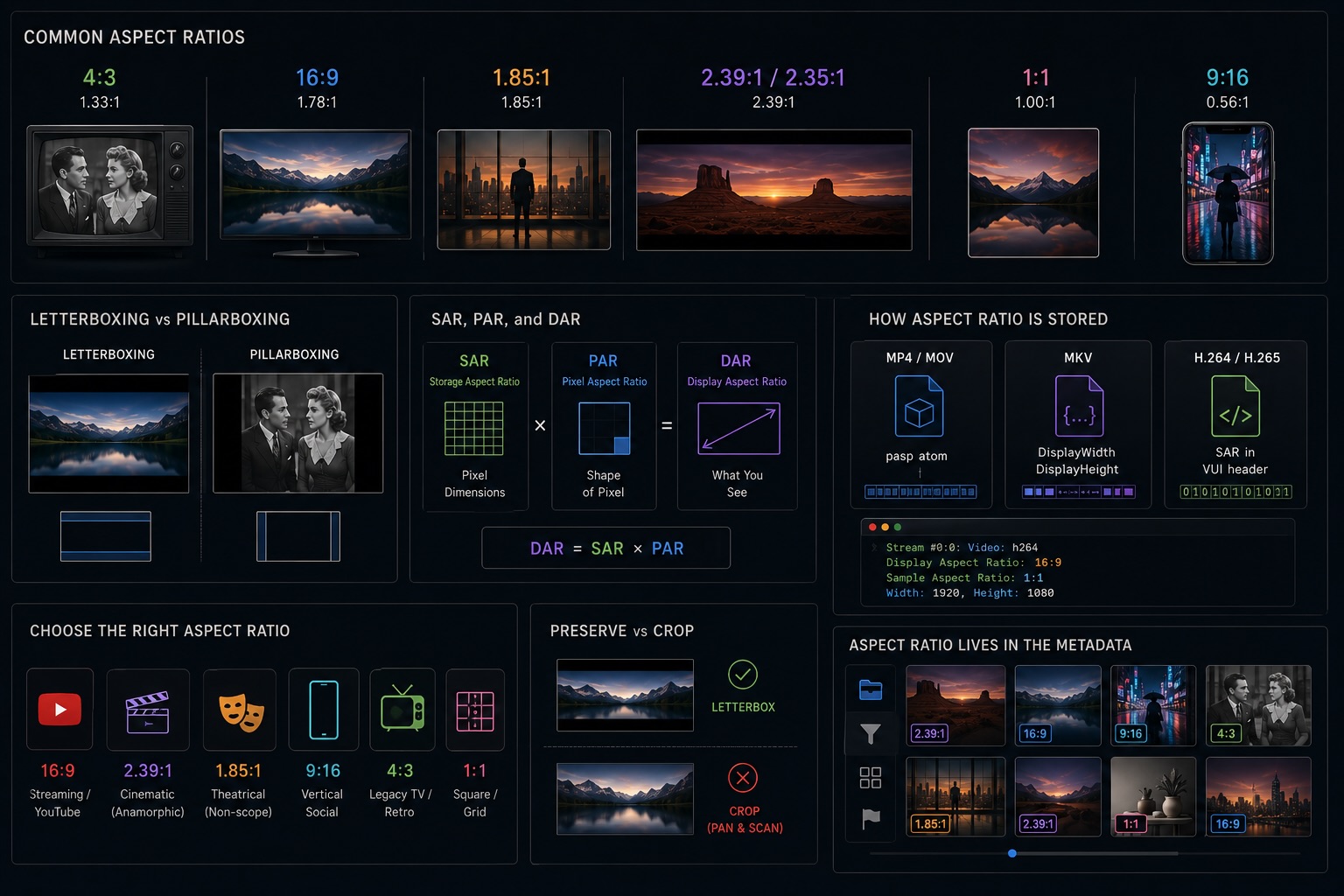
Aspect ratio is one of those numbers that seems obvious until you actually try to explain it. It's the relationship between the width and height of your frame. But behind that simple idea sits a hundred years of television engineering, theatrical exhibition politics, and cinematographic artistry.
16:9, 4:3, 2.39:1, 1.85:1, 9:16 — each ratio carries a history and a specific look. Here's the whole map.
What Aspect Ratio Actually Means
Aspect ratio is written as width:height — the number of units wide relative to the number of units tall.
16:9→ 16 units wide, 9 tall → 1.78:1 in decimal4:3→ 4 units wide, 3 tall → 1.33:1 in decimal2.39:1→ 2.39 units wide, 1 tall (already in decimal form)
The colon notation (16:9) and decimal notation (1.78) refer to the same thing — the decimal form drops the height to 1 and expresses the width as a multiplier.
A wider ratio means a wider frame. Narrower ratios feel more boxed-in. The choice shapes how much horizontal space the viewer's eye has to move through — and in turn, how "epic" or "intimate" a scene reads.
4:3 — the Standard Definition Era
4:3 (1.33:1) was the dominant ratio from the birth of cinema through the end of SD television.
In the 1890s, the Lumière brothers and Thomas Edison independently converged on a frame ratio close to 4:3 — partly dictated by the 35mm film stock they were punching frames onto. By the 1940s, 4:3 was the established ratio for broadcast TV, matching what CRT televisions displayed.
For nearly 70 years, 4:3 was synonymous with "video." Old TV shows, VHS home recordings, early home camcorders — it's the nostalgic boxy frame. If you grew up before HD televisions were common, most of your screen memories are 4:3.
16:9 — the Modern Widescreen Standard
16:9 (1.78:1) is now the universal widescreen standard — every HD and 4K broadcast, streaming platform, YouTube upload, and most smartphone cameras default to this.
The 16:9 ratio wasn't chosen by aesthetics alone. In the 1980s, HDTV standards bodies were trying to agree on a single ratio that could serve both theatrical exhibition (wide) and home television (less wide). The mathematician Kerns Powers surveyed all common film and TV aspect ratios and concluded that 16:9 was the geometric mean of the most popular formats — a compromise everyone could live with.
The HD broadcast specs were formalized around 16:9, and the rest followed: DVD menus, desktop monitors, laptop screens, smartphone screens in landscape, game consoles. 16:9 is now the ambient ratio of digital life.
1.85:1 — Flat Theatrical
1.85:1 (sometimes called "flat") is the dominant theatrical exhibition ratio in North America and Europe for non-widescreen films.
When Hollywood began experimenting with wider frames in the 1950s to compete with television, 1.85:1 emerged as the practical standard for flat-optically projected prints. It's wider than 4:3 but narrower than the anamorphic formats.
Most contemporary "non-cinescope" theatrical films — dramas, comedies, animated features — use 1.85:1. It's wide enough to look cinematic but not so wide that close-up dialogue shots look letterboxed.
2.35:1 / 2.39:1 — Anamorphic Widescreen
2.35:1 and 2.39:1 are the signature ratios of anamorphic widescreen, the format most people associate with "epic cinema."
These two numbers reflect the same aesthetic but different eras:
| Ratio | Era |
|---|---|
| 2.35:1 | Original CinemaScope (1950s–1970) |
| 2.39:1 | SMPTE-standardized from 1970 onward |
The difference is purely technical — a change in projector aperture standards. To the eye, they look the same. Both are sometimes loosely referred to as "2.40" or "scope."
Why Anamorphic Looks Different
Anamorphic lenses squeeze a wider field of view horizontally onto a standard film frame. A 2× anamorphic lens squeezes the horizontal field by half. The camera records a "squeezed" image, then the projector (or software) unsqueezes it on playback, restoring the ultra-wide frame.
The optical side effects of the squeeze are part of the aesthetic:
- Oval bokeh — out-of-focus highlights appear as vertical ovals instead of circles
- Horizontal lens flares — streaks of light run horizontally across the frame
- Shallower depth of field — at the same image size, anamorphic glass is physically larger, yielding thinner focus
Modern digital cameras achieve 2.39:1 framing either with anamorphic glass (for the look) or by simply cropping a 16:9 sensor. The cropped version gives the same ratio but not the optical artifacts.
1:1 — Square
1:1 is the square ratio, synonymous with early Instagram (before it went rectangular) and portrait photography reposted to video.
Square framing was chosen by Instagram because it filled both portrait and landscape phone screens without cropping. It's since fallen out of default usage but remains a valid creative choice — particularly for music album-style visuals or content designed to live in a grid feed.
9:16 — Vertical Video
9:16 is the inverse of 16:9 — portrait orientation, designed for phones held upright. TikTok, Instagram Reels, YouTube Shorts, and Snapchat all use 9:16 as their native ratio.
This is the youngest mainstream ratio and represents the largest shift in frame composition since the widescreen transition. Vertical video requires thinking about subject placement differently — the center of the frame matters more, wide establishing shots lose their power, and talking-head framing becomes natural instead of cramped.
Shooting 9:16 on purpose (rather than cropping from 16:9) means framing for the vertical canvas from the start. Many professional shoots now acquire both ratios simultaneously using camera operators tasked to the respective crops.
Letterboxing and Pillarboxing
When content's native ratio doesn't match the display ratio, the player adds black bars:
- Letterboxing — black bars on the top and bottom (wide content on a narrower display)
- Pillarboxing — black bars on the left and right (narrow content on a wider display)
The classic case: a 4:3 movie on a 16:9 screen gets pillarboxed. A 2.39:1 film on a 16:9 screen gets letterboxed. A 2.39:1 film encoded for a 4:3 master (as happened in early DVD transfers) gets both — the "windowboxed" or "eye-mask" look.
Cropping instead of letterboxing removes the bars by discarding image area. This is called pan-and-scan and was standard practice for VHS. It's now largely considered an editorial violation — you're removing the cinematographer's composition.
PAR, SAR, and DAR — Three Aspect Ratios in One File
A video file can contain up to three distinct aspect ratio values, which is why metadata can seem contradictory:
| Term | What it means |
|---|---|
| SAR — Storage Aspect Ratio | The actual pixel grid dimensions (width × height) |
| PAR — Pixel Aspect Ratio | Whether each pixel is square (1:1) or non-square |
| DAR — Display Aspect Ratio | The ratio the player should show after applying PAR |
DAR = SAR × PAR
Most modern digital video uses square pixels (PAR 1:1), so SAR and DAR are identical. But older SD formats used non-square pixels to squeeze more resolution into limited bandwidth. A standard-definition DV file might have a storage dimension of 720×480 (which would be 4:3 as a square-pixel image) but non-square pixels with a PAR of 10:11, giving a display aspect ratio of 4:3 for NTSC content — or 720×576 at PAR 59:54 for PAL.
When you transcode or remaster SD footage, always check DAR and PAR, not just pixel dimensions. Ignoring PAR is how you get stretched or squished transfers.
How Aspect Ratio Is Stored in Metadata
Aspect ratio is stored in the video container, not the raw pixel data. Different containers handle this differently:
- MP4 / MOV —
paspatom stores PAR; DAR is derived - MKV —
DisplayWidthandDisplayHeightstore DAR explicitly - H.264 / H.265 bitstream — SAR stored in the VUI header
ffprobe will show you all three:
Stream #0:0: Video: h264
  Display Aspect Ratio: 16:9
  Sample Aspect Ratio: 1:1
  Width: 1920, Height: 1080
When SAR and DAR don't match and PAR is not 1:1, you're looking at archival or broadcast footage that needs careful handling.
Choosing an Aspect Ratio
| Use case | Ratio |
|---|---|
| Standard streaming / YouTube | 16:9 |
| Cinematic narrative film, drama | 2.39:1 (anamorphic scope) |
| Documentary, non-scope theatrical | 1.85:1 |
| Vertical social (TikTok, Reels, Shorts) | 9:16 |
| Legacy television, retro look | 4:3 |
| Square grid / music visuals | 1:1 |
The key is to decide before you shoot, not after. Framing for 2.39:1 and then discovering your camera recorded 16:9 and you want scope means cropping pixels you've already captured. Shooting natively in the target ratio means the composition is right from the first take.
Aspect Ratio Lives in the Metadata
When VideoTagger ingests your library, it reads the display aspect ratio from each file's container metadata — including PAR-corrected values for older SD footage. The result: you can filter and browse your library by aspect ratio across all your clips.
- Pull every 2.39:1 scope clip from a project
- Separate 16:9 clips from 9:16 vertical clips automatically
- Flag non-square-pixel files for transcoding review before editing
Aspect ratio is a first-class metadata field alongside frame rate, codec, and resolution. A library that's searchable by ratio is a library you can navigate — especially when mixing footage from multiple cameras, formats, or decades.
Summary
- 4:3 was the universal standard from early cinema through SD television
- 16:9 is the modern default, the geometric compromise chosen for HD broadcasting
- 1.85:1 is flat theatrical — the standard for non-scope cinema
- 2.39:1 is anamorphic scope — ultra-wide, defined by optical squeeze and distinctive lens effects
- 9:16 is vertical video, the dominant format for mobile-first social platforms
- Letterboxing preserves composition; cropping discards it
- SAR, PAR, and DAR are three different measurements that can coexist in one file — check all three for archival footage
- Aspect ratio is stored in the container, readable by any metadata tool, and filterable in VideoTagger
Related articles
HDR, Explained — HDR10, Dolby Vision, HLG, and What "High Dynamic Range" Actually Means
HDR is sold as "brighter, more vivid" — but that marketing hides what's really going on. Here's what dynamic range actually is, why HDR needs PQ or HLG curves and 10-bit color, and how HDR10, Dolby Vision, and HLG differ in one sitting.
Color Spaces, Explained — sRGB, Rec.709, Rec.2020, and DCI-P3
sRGB, Rec.709, Rec.2020, DCI-P3 — these labels appear on cameras, monitors, and delivery specs, but what do they actually mean? Here's the complete map of video color spaces and why they matter for shooting, grading, and delivery.
Shutter Angle, Explained — The 180° Rule and How Motion Feels in Video
You bumped the shutter speed to 1/1000 the way you would for a photo, and now the footage looks stuttery on playback. In video, shutter doesn't control brightness — it controls how motion reads. Here's shutter angle, the 180° rule, and frame rate, in one sitting.