
Frame Rate, From the Ground Up — Why 24fps Looks Like Film and 29.97 Has a Decimal
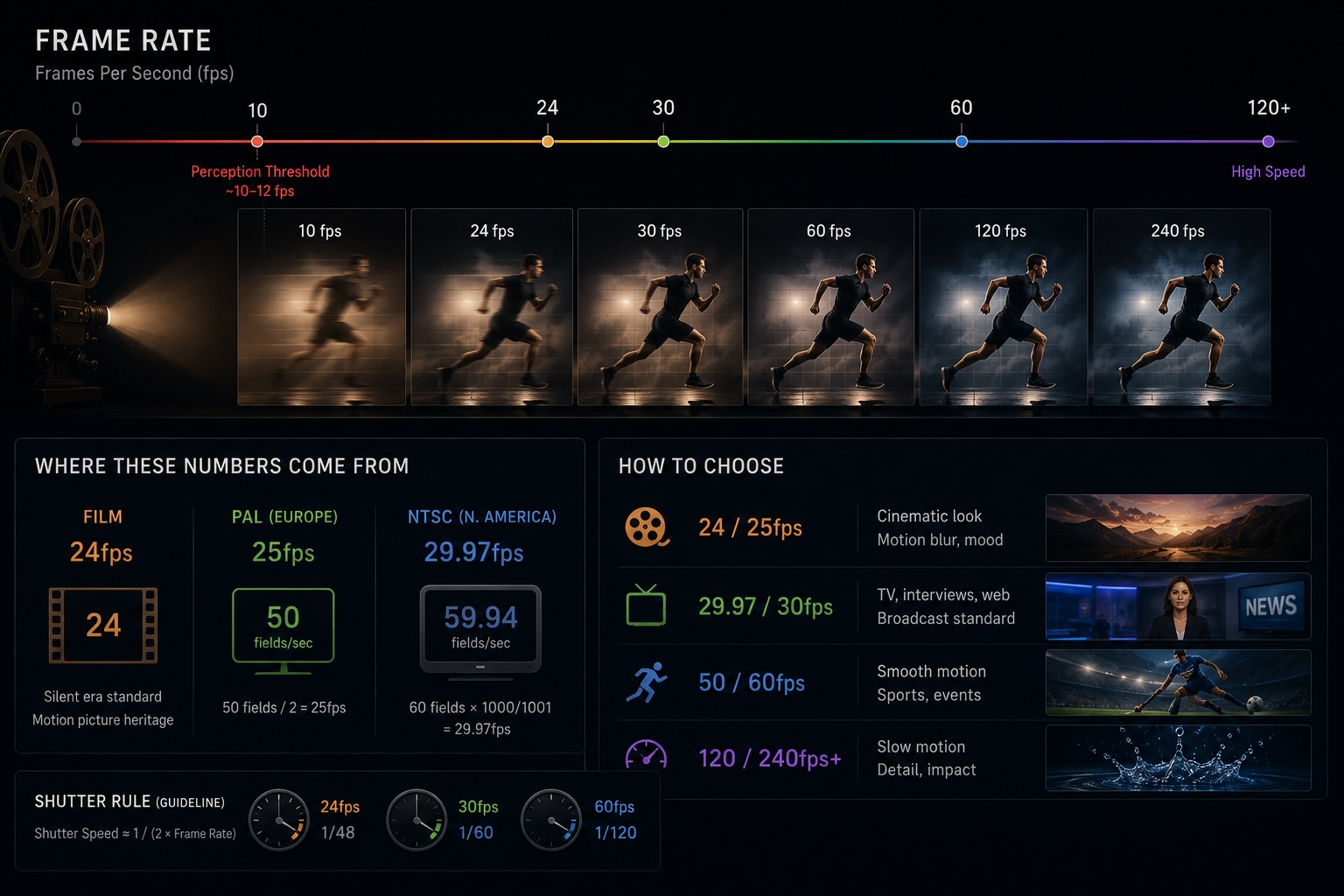
Open the frame rate menu on any modern camera and you're confronted with 24 / 25 / 29.97 / 30 / 50 / 59.94 / 60 / 120 / 240. Why so many options? Which one are you supposed to pick? Surprisingly few shooters can answer that off the cuff.
Each of those numbers carries some mix of film-era mechanical history, broadcast TV politics, properties of human vision, and an aesthetic intent for how motion should feel. This post walks the whole map: where each frame rate came from, what it's actually used for, and how to pick one on purpose.
What a Frame Rate Even Is
Frame rate is "how many still images per second you're showing the viewer." Unit: fps.
- 24fps → 24 frames per second
- 60fps → 60 frames per second
More frames = smoother motion. Fewer frames = choppier motion. But this is not a "more is better" situation — the number you choose sets the tone of the footage.
The human visual system starts perceiving "motion" rather than discrete still images somewhere around 10–12fps (apparent motion). That's the floor for the brain to fuse frames. Everything from there up is aesthetic, not perceptual necessity.
24fps — the Cinema Standard
24fps is the cinema standard. Silent film ran around 16–18fps, but when talkies arrived in the late 1920s, frame rate had to lock to a number that synced cleanly with the audio track on the film strip — 24 won out as a practical compromise between mechanical cost and acceptable motion.
The reason 24fps survived into the streaming era isn't technical. It's cultural.
- A century of cinema-going has trained audiences to read the slight juddery quality of 24fps as "cinematic"
- Streamers and theatrical distribution still master at 24fps for film
- Music videos, commercials, and documentaries reach for 24fps when they want that "movie feel"
The weird part: 24fps is not actually smooth. Pan a camera horizontally and the judder is visible to anyone paying attention. But the cultural association is strong enough that the choppiness reads as intentional — even desirable. A frame rate frozen in place by aesthetics, not engineering.
25fps — the PAL Standard
25fps was the broadcast standard for 50Hz electrical regions — Europe, Australia, parts of Japan (eastern), and many others.
- The PAL (Phase Alternating Line) color TV standard ran at half the mains frequency: 50Hz ÷ 2 = 25fps
- Synchronizing to mains frequency made flicker handling under fluorescent lighting easier
- 25fps reads visually close to 24fps, so European productions could approximate the cinema look without conversion gymnastics
Digital distribution has loosened the broadcast tether, but for content aimed at European markets, 25fps still makes sense — both for ingestion into broadcast pipelines and for cultural familiarity.
29.97fps and 30fps — the NTSC Inheritance
Here's where things get weird.
30fps was the broadcast standard for 60Hz regions — North America, western Japan, parts of South America. Half the mains frequency (60Hz ÷ 2 = 30) made early black-and-white TV electrically clean.
When color TV arrived, color information had to be squeezed into the existing signal without disrupting the audio carrier. The mathematical solution was to nudge the frame rate down by a tiny amount: 30 × 1000 / 1001 ≈ 29.97fps.
That's where the 29.97 comes from. A compromise to keep audio and color subcarriers from interfering.
| Number | How it came about |
|---|---|
| 30 | Black-and-white NTSC broadcast (mains 60Hz ÷ 2) |
| 29.97 | The same standard, nudged down to make room for color |
In practice, when a camera or NLE says "30p," it almost always means 29.97. True 30.0fps is mostly relevant for web-only or monitor-display content where no broadcast pipeline is involved.
23.976fps — the 24 You'll Actually Get
The same NTSC dance produced another oddball: 24 × 1000 / 1001 ≈ 23.976. This is "24fps, NTSC-compatible."
- Theatrical projection → exact 24fps
- Broadcast / streaming distribution → 23.976
- Edit timelines → almost always 23.976 in NTSC-territory production
Most cameras labeled "24p" actually output 23.976. NLEs separate "24p" and "23.976p" in their timeline settings because the two are distinguishable when timecode and audio sync enter the picture, even though they look identical.
Drop-Frame Timecode — What the ; Means
29.97fps creates an additional headache: real time and frame count drift apart.
In one hour (3600 seconds), you actually capture 29.97 × 3600 = 107,892 frames. If your timecode counts up like it was 30fps, you'd label frame 108,000 — 3.6 seconds ahead of wall-clock.
Drop-frame timecode is the fix:
- Notation:
01:00:00;00(semicolon) - Non-drop notation:
01:00:00:00(colon) - Periodically, frame numbers are skipped to keep the clock honest. No actual frames are discarded — just the labels.
Broadcast delivery, where program lengths have to land on the second, requires drop-frame. Web delivery and personal projects are fine with non-drop — the convenience of integer counting beats the wall-clock drift.
60fps (59.94fps) — Smoothness with a Catch
60fps (in NTSC territory, usually 59.94) is what you choose when smooth motion matters more than cinematic feel.
- Sports broadcasting — fast motion stays legible
- Game streaming and Let's Plays — anything less and the gameplay looks broken
- Action cameras — handles shake and fast subjects gracefully
- iPhone HDR video — often defaults to 60fps
There's a catch: 60fps footage often reads as "too real," "soap-opera-like," "home-video-ish." This is the soap opera effect. Audiences trained on a century of 24fps film find 60fps smoothness uncanny — not lifelike, but cheap.
This is why TV store demo reels showing "frame interpolated" content feel off. The TV is faking 60fps from 24fps source, and the eye reads it as wrong. 60fps for the wrong project actively damages the look.
120fps and 240fps — Capture for Slow Motion
120 and 240fps exist primarily so you can play frames back slower than they were captured.
- Shoot 120fps, play 24fps → 5× slow motion
- Shoot 240fps, play 24fps → 10× slow motion
The trade-off at high frame rate is exposure: each frame gets a much shorter slice of light, so low-light gets hard fast. The 180° shutter angle rule still applies for natural motion blur per frame (see Shutter Angle, Explained).
Shooting 120fps for real-time playback is rarely useful. You get smoothness, but the soap-opera effect hits even harder than 60fps.
VFR vs CFR — the Smartphone Trap
Everything above assumes a constant frame rate (CFR): each second, the camera writes the exact number of frames you set. Some devices — smartphones especially — use variable frame rate (VFR) instead: frames-per-second floats in real time based on scene brightness or processing load.
- CFR — locked output, e.g., exactly 30 frames per second
- VFR — output rate drifts; the file might average 30fps but vary frame-to-frame
VFR is fine for playback. It is a nightmare in an edit:
- iPhone 4K 60fps recordings often land as VFR
- DaVinci Resolve and Premiere Pro interpret VFR as the closest CFR, which can cause audio drift and frame-accurate cuts to miss
- The safe move: convert VFR to CFR before ingesting, using
HandBrakeorFFmpeg
If your library mixes phone footage with camera footage, knowing which clips are VFR vs CFR is as important as knowing their frame rate.
How to Choose
When in doubt, pick by use case:
| Use case | Frame rate |
|---|---|
| Cinematic look | 24fps (or 23.976) |
| European broadcast / distribution | 25fps |
| North American, YouTube default | 29.97 or 30fps |
| Sports, gaming, action | 60fps (59.94) |
| Slow-motion source material | 120 / 240fps |
| Documentary | 24 or 30 — pick one and lock it for the whole piece |
The single most important rule: don't mix frame rates carelessly within one project. When you must (e.g., 24fps base with 120fps slow-motion inserts), set the timeline to your base rate and conform the high-fps clips into it.
Frame Rate Is Locked to Shutter Speed
Frame rate and shutter speed are not independent settings. They travel together. Following the 180° rule (shutter denominator = double the frame rate) preserves the natural motion feel across whichever frame rate you pick.
- 24fps + 1/50 sec
- 30fps + 1/60 sec
- 60fps + 1/120 sec
- 120fps + 1/240 sec
Once this pairing is in your hands, the "I bumped shutter and now motion stutters" mistake stops happening. Full treatment in the companion piece: Shutter Angle, Explained.
Frame Rate Lives in the Metadata
Whatever frame rate you shoot at is recorded at the container level of the video file, reliably. ffprobe and ExifTool will read it back in seconds.
- Nominal frame rate (what the menu said)
- Average frame rate (the real number, especially for VFR)
- Timecode base frame rate
The broader story on container metadata is in Do Videos Have EXIF?. Frame rate is among the most reliably preserved fields — it's how library tools can sort and filter across your archive.
VideoTagger Filters Your Library by FPS
VideoTagger reads the frame rate of every clip at ingestion and lets you filter the whole library by FPS range.
- "Pull every 24fps clip in the library for the cinematic project"
- "Surface only the 60fps coverage from that event for the slow-motion edit"
- "Find me the exact-30fps clips in a library that's mostly 29.97"
These queries are essentially impossible by folder structure or filename. The moment frame rate becomes a filter, your library becomes navigable — especially when you've got multiple cameras and operators feeding the same archive.
Summary
- 24fps is the cinema standard, kept alive by culture rather than engineering
- 25 / 29.97 / 30 come from broadcast TV, especially the NTSC color-television compromise
- 23.976 and 29.97 are the NTSC color adjustments — the decimal isn't a typo
- 60fps is smooth but reads as "soap opera" in the wrong context
- 120 / 240fps is for slow motion, not real-time playback
- VFR is the smartphone trap — convert to CFR before editing
- Don't mix frame rates within a project, and when you must, conform to the timeline
Frame rate is an expressive choice as much as a technical one. Once you know what each number means, picking one on purpose changes the tone of the whole project before a single shot is taken.
Related articles
Shutter Angle, Explained — The 180° Rule and How Motion Feels in Video
You bumped the shutter speed to 1/1000 the way you would for a photo, and now the footage looks stuttery on playback. In video, shutter doesn't control brightness — it controls how motion reads. Here's shutter angle, the 180° rule, and frame rate, in one sitting.
Video Resolution, Explained — SD, HD, 4K, 8K, and What More Pixels Actually Buy You
"4K" is on every camera box and TV shelf, but resolution is the most misread number in video. Here's what the tiers from SD to 8K actually are, why DCI 4K and UHD aren't the same thing, why more pixels don't guarantee a sharper picture, and when they genuinely pay off.
HDR, Explained — HDR10, Dolby Vision, HLG, and What "High Dynamic Range" Actually Means
HDR is sold as "brighter, more vivid" — but that marketing hides what's really going on. Here's what dynamic range actually is, why HDR needs PQ or HLG curves and 10-bit color, and how HDR10, Dolby Vision, and HLG differ in one sitting.