
Why 10-bit 4:2:2 Matters — Bit Depth and Chroma Subsampling, Demystified
You've seen the labels — 10-bit 4:2:2, 8-bit 4:2:0 — and you probably know more is generally better. But more what, exactly, and when does it stop mattering?
This post pulls the two numbers apart, shows where each shows up in the picture, and lays out what you actually want for different kinds of work.
Bit Depth — How Finely Tones Are Sliced
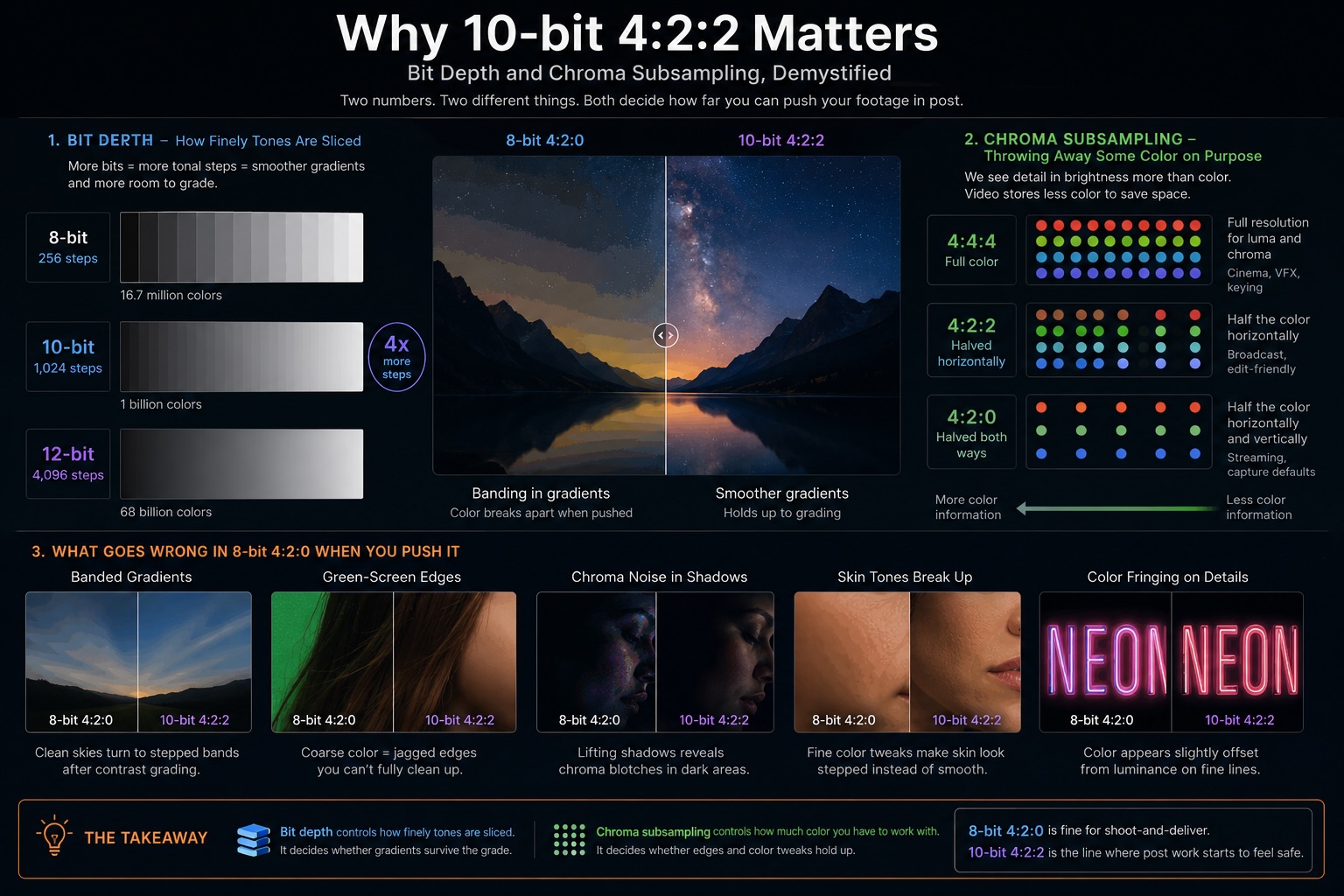
Bit depth is the number of steps used to represent brightness on each channel.
- 8-bit — 256 steps per channel ≈ 16.7 million colors total
- 10-bit — 1,024 steps per channel ≈ 1 billion colors total
- 12-bit — 4,096 steps per channel ≈ 68 billion colors total
In isolation, 8-bit sounds like plenty. The problem shows up after grading. When you stretch contrast or push color in post, anywhere the tonal steps are coarse turns into visible banding — those soft rings you see in skies, on cheeks, on walls.
10-bit is four times finer than 8-bit. The same amount of grading on 10-bit material holds together; on 8-bit it can fall apart. This is why log shooting all but requires 10-bit — log compresses the image at capture so it can be re-expanded later, and if the underlying steps are coarse, that re-expansion is exactly where banding lives.
Chroma Subsampling — Throwing Away Some Color on Purpose
Human vision is much more sensitive to brightness than to color. Video compression takes advantage of this by storing fewer color samples than brightness samples. The "4:2:2" and "4:2:0" labels describe how aggressively the color information is thinned.
| Luma (brightness) | Chroma (color) | Typical use | |
|---|---|---|---|
| 4:4:4 | Full | Full | Cinema, VFX, keying |
| 4:2:2 | Full | Halved horizontally | Broadcast, edit-friendly |
| 4:2:0 | Full | Halved both ways | Streaming, capture defaults |
For passive viewing, 4:2:0 looks fine. The trouble shows up in post-production:
- Green-screen / chroma key — coarse color = ragged, jagged edges
- Strong color grading — color boundaries smear or bleed
- Titles and fine colored lines — color appears slightly offset from luminance
4:2:2 carries twice as much color information as 4:2:0, and the headroom is obvious the moment you start pushing.
What Goes Wrong in 8-bit 4:2:0
Phone footage and most consumer-camera output is 8-bit 4:2:0 by default. For straight cut-and-deliver editing, it's genuinely fine. The trouble arrives when you start changing things:
- A clean sky develops banded rings after a contrast grade
- Green-screen edges come out with colored jaggies you can't fully clean up
- Lifting shadows reveals chroma blotches in faces and dark areas
- Fine color tweaks make skin tones look stepped instead of smooth
Think of 8-bit 4:2:0 as a ceiling: "fine for what you shoot, marginal for what you change." The more aggressive the post work, the more reason to step up.
Practical Choices by Use Case
Shooting at maximum spec all the time isn't realistic — it costs storage, time, and often the camera body itself. Here's what actually pays off:
| Job | Recommended | Why |
|---|---|---|
| YouTube, straight cuts | 8-bit 4:2:0 | Minimal grading |
| Interview, standard gamma | 8-bit 4:2:0 OK, 10-bit safer | Light skin / shadow tweaks |
| Log shooting | 10-bit 4:2:2 or higher | Re-expanding the curve in post |
| Product / food / art | 10-bit 4:2:2 | Color matters precisely |
| Compositing / green screen | 4:2:2 minimum, 4:4:4 ideal | Edges live or die here |
| Cinema / broadcast delivery | 10/12-bit 4:2:2+ | Often required by spec |
The most useful question to ask: how much will you push this in the grade? Not much → 8-bit 4:2:0 is fine. A real grade → 10-bit 4:2:2. Compositing → 4:4:4 if you can get it.
See also the companion post on log gamma, which is the workflow where this all matters most.
On Keeping the Originals
10-bit 4:2:2 masters are heavy. There's a temptation, once a project is delivered, to keep only the 8-bit 4:2:0 export and toss the originals. Don't.
Once you've collapsed footage to 8-bit 4:2:0, you can't recover what you threw away. If you want any chance of repurposing the material — a recut, a reframe for vertical, an upscale a few years from now — you need the original capture format on disk.
This is also part of why an indexed archive matters: workflows like VideoTagger assume the originals stay around and stay searchable. The storage cost is real, but it's the cost of keeping footage usable, not just kept.
Wrapping Up
- Bit depth controls how finely tones are sliced — it decides whether gradients survive the grade.
- Chroma subsampling controls how much color you have to work with — it decides whether edges and color tweaks hold up.
- 8-bit 4:2:0 is fine for shoot-and-deliver. 10-bit 4:2:2 is the line where post work starts to feel safe.
- If you're shooting log, treat 10-bit 4:2:2 as effectively required.
The spec sheet numbers aren't goals in themselves — pick them backwards from what you actually plan to do with the footage.
Related articles
HDR, Explained — HDR10, Dolby Vision, HLG, and What "High Dynamic Range" Actually Means
HDR is sold as "brighter, more vivid" — but that marketing hides what's really going on. Here's what dynamic range actually is, why HDR needs PQ or HLG curves and 10-bit color, and how HDR10, Dolby Vision, and HLG differ in one sitting.
Color Spaces, Explained — sRGB, Rec.709, Rec.2020, and DCI-P3
sRGB, Rec.709, Rec.2020, DCI-P3 — these labels appear on cameras, monitors, and delivery specs, but what do they actually mean? Here's the complete map of video color spaces and why they matter for shooting, grading, and delivery.
What Log Footage Actually Is — Making Sense of S-Log, V-Log, and N-Log
Switched to S-Log and ended up with flat, lifeless footage? That's the point. Here's what log gamma is for, what you need around it to make it work, and when not to bother.